I Turned 16 Months of Google Search Console Data Into a Vector Database.
-min.png)
I use OpenClaw as my daily SEO automation agent. It handles a lot of the repetitive work for me, but I kept running into the same limitation: OpenClaw is great at executing tasks and running skills, but it doesn't have deep awareness of my historical search performance. It knows what I tell it in the moment. It doesn't know that a query cluster has been declining for three months or that a page I published in January is now cannibalizing an older one. It's trying to work with the GSC API but crashes then start working on "made up" data by itself...
So I built a tool that pulls 16 months of GSC data, embeds it into a local ChromaDB vector database, and lets me ask questions in plain English using Gemini, Grok, or Claude. I also wired up Parallel.ai to scrape competitor pages so the AI can tell me what content I'm missing.
The tool works. But building it taught me more about when vector databases make sense and when they don't than any tutorial ever could.

What I Built
The pipeline is straightforward:
- Extract all GSC data via the API (queries, pages, clicks, impressions, CTR, position, dates)
- Aggregate the raw rows into query-page pair documents with computed trends (rising, declining, stable, new)
- Embed everything using Gemini's embedding model and store it in ChromaDB
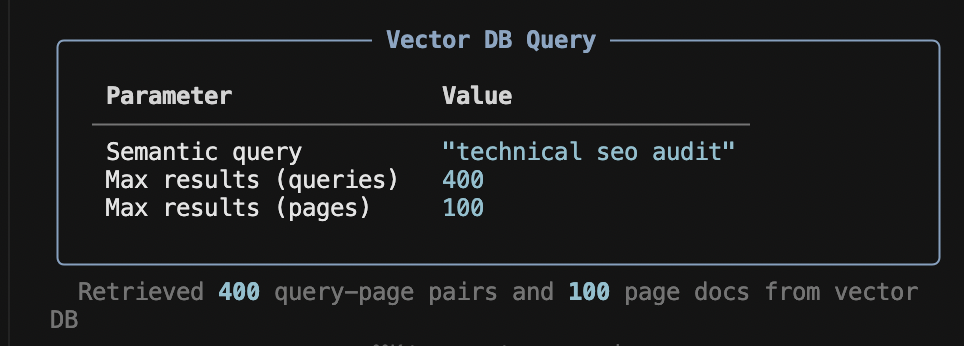
- Query the vector database semantically and feed the results to an LLM for analysis
I added three LLM providers because they each bring something different. Gemini Flash is fast and free, good for quick checks. Grok has a 2M token context window, so I can send it 400 documents from the vector DB instead of 50. Claude tends to give more strategic, nuanced recommendations.
For deeper analysis, I integrated Parallel.ai's search and extract APIs. This lets me scrape my own pages and competitor pages, then feed everything to the AI for a side-by-side content gap analysis. The GSC data tells me how I rank. The scraped content tells me why.
The Honest Problem With This Approach
Here's the thing I don't see people talk about enough: GSC data is structured. It's rows and columns. Queries, numbers, dates. This is exactly what SQL databases were designed for.
When I ask the vector database "find queries with high impressions but low CTR," it doesn't actually do math. It embeds that sentence and finds documents whose text is semantically similar to it. That's a fundamentally different operation than SELECT * FROM gsc WHERE impressions > 1000 AND ctr < 0.03.
The vector DB might return a query with 200 impressions because its text happened to be close in embedding space. It might miss a query with 50,000 impressions because the text representation didn't match. There's no guarantee of numerical correctness.
For aggregations like "top 10 pages by clicks" or "average CTR by device type," SQL would give me the exact right answer every time. The vector DB gives me a best-effort approximation based on text similarity.
Where the Vector DB Actually Helps
That said, there are things the vector DB does that SQL simply can't.
If I ask "what content about AI is performing on my site?", the vector DB finds queries like "neural network tutorial," "transformer architecture explained," and "deep learning vs machine learning." None of those contain the words "AI," but they're all semantically related. To get this from SQL, I'd need to manually build keyword lists for every possible topic. That doesn't scale.
The natural language interface is genuinely useful. I can ask vague, exploratory questions like "what's happening with my technical SEO content?" and get relevant data back. With SQL, I'd need to know exactly what I'm looking for before I can write the query.
The vector DB also surfaces connections I wouldn't think to look for. When related queries cluster together in embedding space, patterns emerge that I'd miss scrolling through spreadsheets.
The Comparison Nobody Makes
I keep seeing people build GSC MCP servers for real-time lookups. That works for quick checks, but you can't do bulk historical analysis across 16 months of data through an MCP. Every question is an API call, and you hit rate limits fast on complex analyses.
Here's how the three approaches actually compare:
| Vector DB | GSC MCP Server | SQL DB | |
|---|---|---|---|
| Data freshness | Stale (needs refresh) | Real-time | Stale (needs import) |
| Numeric precision | Fuzzy | Exact | Exact |
| Semantic search | Yes | No | No |
| Natural language queries | Yes | No | No |
| 16 months of history | Yes | Limited by API quotas | Yes |
| Speed | Instant (local) | Slow (API calls) | Instant (local) |
| Competitor content analysis | Yes (via Parallel.ai) | No | No |
| Best for | Discovery and exploration | Live quick lookups | Precise metric filtering |
The honest answer is that the ideal setup would combine SQL for exact numerical queries with a vector DB for semantic discovery, with an LLM layer on top of both. My tool leans into the vector DB side, which makes it strong for exploratory analysis but less precise for exact metric filtering.
What Actually Matters
The part of this project that adds the most value isn't the vector database itself. It's the data processing pipeline.
The raw GSC API returns one row per query per page per date. For a site with decent traffic over 16 months, that's millions of rows. My data processor aggregates all of that into meaningful documents: total clicks, average CTR, weighted average position, and a trend classification based on comparing recent performance to historical performance.
That aggregation step turns noise into signal before anything touches the vector DB or the LLM. Without it, you'd be embedding raw API rows, which is mostly useless.
The second most valuable piece is the Parallel.ai integration. GSC data only tells you what's happening. It doesn't tell you what your competitors are doing differently. By scraping actual page content and feeding it alongside GSC metrics to the LLM, the analysis goes from "your CTR is low" to "your competitors have comparison tables and FAQ sections that you're missing."

How to Use It
The tool is open source: github.com/metehan777/vectordb-gsc
Setup takes a few minutes. You need a Google Cloud service account with Search Console API access, a free Gemini API key for embeddings and analysis, and optionally API keys for Grok, Claude, or Parallel.ai.
git clone https://github.com/metehan777/vectordb-gsc.git
cd vectordb-gsc
pip install -r requirements.txt
First run:
python main.py extract    # pulls 16 months of data
python main.py process    # embeds into ChromaDB
Then ask anything:
python main.py ask "which queries are declining?" --grok
python main.py audit "https://yoursite.com/page/" --grok
python main.py compete "your target keyword" --claude
What I'd Do Differently
If I were starting over, I'd add DuckDB alongside ChromaDB. Use SQL for any question involving specific numbers or thresholds, and the vector DB for semantic discovery and topic clustering. The LLM would decide which backend to query based on the question.
I'd also experiment with embedding the data differently. Right now, each document is a text description like "Query: seo tools, Page: /blog/seo, Clicks: 150, Impressions: 5000." The numerical values get lost in embedding space. A better approach might be to store metrics separately as metadata and only embed the semantic content (query text, page URL, topic).
But the current version works well enough for what I actually use it for: finding patterns, discovering opportunities, and getting content recommendations that are grounded in real data rather than generic advice.
The code is MIT licensed. If you find it useful or want to improve it, contributions are welcome.
If you care about longitudinal data like this, see tools with historical trend analysis for AI brand visibility .
Vectorizing GSC data is the most underrated AEO workflow. It reveals clusters of queries that drive AI citations in ChatGPT, Perplexity and Gemini. Answer engine optimization at scale needs this layer.
Get new research on AI search, SEO experiments, and LLM visibility delivered to your inbox.
Powered by Substack · No spam · Unsubscribe anytime